TLDR
- Neither method automatically produces better MTG proxies. A well-run toner press can outperform a mediocre inkjet, and a high-end production inkjet can outperform poorly calibrated toner equipment.
- Toner is especially strong for crisp rules text, immediate handling, and predictable short-run production.
- Inkjet can excel at gradients, subtle color transitions, and artwork, but only when the ink, paper coating, drying system, and color profile work together.
- Cardstock, coating, registration, cutting, and file preparation often matter as much as the printing method.
- For home printing, inkjet is usually more flexible for artwork-heavy cards. For commercial orders, judge the finished samples rather than the technology label.
The debate over toner vs inkjet printing for MTG proxies sounds simple until two cards made with the same general technology look completely different. One has sharp text, controlled color, and clean shadows. The other looks muddy, streaked, or strangely shiny.
The printer type matters, but it is only one part of the process. A proxy card is the combined result of the file, color conversion, ink or toner, cardstock, coating, registration, cutting, and quality control. Printing has never been shy about finding several ways to ruin one small rectangle.
Direct Answer
Toner is not inherently better than inkjet for MTG proxies, and inkjet is not inherently better than toner.
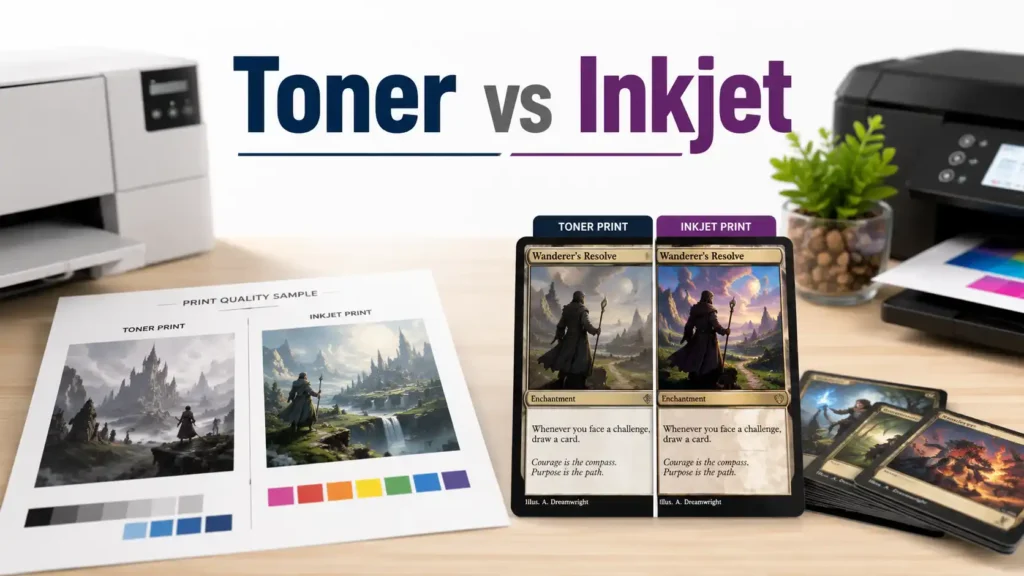
Toner commonly performs well with small text, fast handling, and short commercial runs. Inkjet often performs well with photographic artwork and smooth gradients, particularly on equipment designed for coated media.
The better result comes from the better complete workflow. Modern toner presses use automated color and registration controls, while production inkjet presses can produce detailed output on heavy coated stock. Neither label tells you whether the colors are accurate, the backs align, or the cutter is drifting.
How Toner and Inkjet Printing Work
Toner Printing
Toner printing uses dry polymer particles. The printer forms an electrostatic image, transfers toner to the sheet, and uses heat and pressure to fuse it to the surface. HP describes the fuser as bonding toner with heat and pressure, while Xerox notes that laser-rated paper must tolerate the heat used during fusing.
Digital file → toner transfer → heat and pressure → coating → cutting
Because toner is fused near the surface, it can create sharp edges and dense color. Heavy coverage may also produce visible sheen or a slightly raised feel.
Inkjet Printing
Inkjet printing places microscopic droplets of liquid ink onto the media. Those droplets must land accurately, remain controlled, and dry or cure correctly. Epson describes inkjet printers as placing tiny droplets onto paper, and its professional print technology uses precisely controlled droplet placement for sharp lines and detailed images.
Digital file → ink droplets → media controls spread → drying or fixation → coating → cutting
Inkjet quality depends heavily on media compatibility. The wrong stock can allow ink to spread, soak unevenly, or scuff. Commercial systems may use pigment inks, conditioning fluids, and controlled drying to print cleanly on coated sheets. Canon’s sheetfed production inkjet systems support coated stock up to 350 gsm, showing how far commercial inkjet has moved beyond the ordinary desktop printer.
Toner vs Inkjet Printing for MTG Proxies: Side-by-Side
| Quality Factor | Toner | Inkjet | What Matters Most |
|---|---|---|---|
| Small rules text | Usually crisp and well defined | Can be equally sharp on suitable stock | Calibration, media, source file |
| Gradients | Good, but halftone texture or banding may appear | Often very smooth | Printhead, screening, profile |
| Dark artwork | Dense blacks, but shadows may plug | Good tonal control, but excess ink may muddy detail | Black generation and ink limits |
| Surface | May show toner sheen | Often looks more integrated with the sheet | Coating and laminate |
| Handling | Dry immediately after fusing | Depends on drying or curing | Equipment and workflow |
| Edge durability | Poor adhesion can chip at cuts | Weak fixation can scuff | Media compatibility and finishing |
| Double-sided alignment | No automatic advantage | No automatic advantage | Paper transport and registration |
| Home use | Fast and clean for playtest sheets | Flexible for artwork and one-offs | Feed limits, media, cutting |
The table points to the central lesson: the print engine matters, but it does not work alone.
Text, Artwork, and Color Accuracy
MTG cards combine detailed artwork with small type, mana symbols, thin frame elements, and compact rules boxes. That makes them a useful stress test for any printing process.
Toner is often strong with small black text because the fused particles create firm edges. Inkjet can match that sharpness on the right equipment, but unsuitable paper, clogged nozzles, or excessive ink can soften fine details.
When inspecting a sample, check:
- Italic and reminder text
- White text over dark boxes
- Outlines around mana symbols
- Collector information
- Diagonal lines and curves
- Black text beside saturated artwork
Artwork quality requires more than bright color. Look for retained shadow detail, neutral grays, smooth gradients, and reds or blues that do not swallow fine texture. A very saturated card may look dramatic while still being inaccurate.
Inkjet has a natural strength in smooth color transitions, especially with variable droplet sizes and well-matched coated media. Toner can still produce excellent artwork on a modern production press with good screening and calibration. Comparing a cheap office laser with a photo inkjet does not tell you what commercial equipment can do.
Surface Feel and Durability
The native print process affects the surface, but the final coating may affect it more.
Heavy toner coverage can create sheen or slight relief. Inkjet may look flatter, but that depends on how the ink interacts with the coating. Once a printer adds aqueous coating, UV coating, varnish, or lamination, the original difference may become much less noticeable.
Inspect finished cards for:
- Glare under direct light
- Fingerprints on dark areas
- Inconsistent texture between cards
- Cards sticking together
- Scuffing during sleeving
- Toner flaking or ink loss at cut edges
Properly fused toner is ready to handle immediately. Its relevant failure mode is poor adhesion, which can cause chipping or flaking. Inkjet durability varies more by ink chemistry and coating. Pigment ink, dye ink, and commercial water-based pigment systems do not behave the same way.
Neither process makes a card waterproof by default. Open drinks remain a remarkably effective cross-platform testing standard.
Registration, Cutting, and Card Construction
Printing technology does not determine the card’s size, core color, stiffness, corner radius, or sleeve fit. It also does not guarantee that the front and back align.
Those qualities depend on:
- Sheet feeding and duplex registration
- Cardstock construction
- Coating thickness
- Cutter accuracy
- Sheet movement during finishing
- Operator setup and inspection
Both toner and inkjet production systems can include automated registration and inline quality controls. Both can also produce visibly shifted cards when the workflow is poorly controlled.
This is why a seller has not proven much by advertising black-core stock, a high DPI number, or one recognizable press model. The cards still need to be printed, coated, and cut correctly.
File Resolution and Practical Quality Thresholds
Standard trading cards are commonly sized at 2.5 by 3.5 inches, approximately 63 by 88 millimeters. At 300 pixels per inch, the finished image area requires at least 750 by 1,050 pixels before bleed. A printer’s template will require a larger file because the artwork extends beyond the cut line.
MakePlayingCards, for example, lists a minimum poker-card upload size of 822 by 1,122 pixels at 300 DPI. Adobe also identifies 300 DPI as a common resolution for professional print work.
Use these preparation rules:
- Build raster artwork at 300 PPI or higher at final size.
- Follow the printer’s exact bleed and safe-area template.
- Keep names, mana costs, and rules text away from the cut line.
- Do not enlarge a small web image and assume changing the PPI field restores detail.
- Use the color mode and file format requested by the printer.
- Avoid repeated JPEG compression.
Printer DPI and image PPI are not interchangeable. A press’s output resolution describes how it places dots and builds tones. It does not mean the source art should use the same number of pixels per inch.
A Useful Test Set
Before ordering an entire Commander deck or Cube, print a small group containing:
- One text-heavy card
- One card with near-black shadow detail
- One smooth gradient
- One heavily saturated image
- One neutral gray or colorless design
- One thin border that exposes centering errors
- One paired front-and-back test
Inspect repeated copies, not only the best card in the batch. Practical warning signs include recurring shifts around 1 millimeter or more, blocked shadows, visible banding, fuzzy rules text, edge flaking, ink scuffing, and cards that remain curled after resting flat.
These are practical inspection guidelines, not universal manufacturing tolerances.
Which Process Is Better for Home Printing?
For DIY proxies, inkjet is usually more flexible when artwork quality is the priority. A good pigment inkjet on compatible double-sided matte media can produce attractive tokens, playtest cards, and one-off designs.
The drawbacks are drying time, media cost, moisture sensitivity, duplex alignment, and difficulty feeding heavy stock.
A color laser printer is convenient for fast playtest sheets. Text is generally clean and the pages are ready to handle immediately. But heavy stock may exceed the feed specification, and inkjet-only glossy paper should not be run through a laser printer. Use only media rated for the device.
Neither home process automatically creates a card that handles like a manufactured trading card. That requires the right core stock, consistent thickness, durable finishing, precise duplex alignment, and accurate cutting.
For responsible casual use, choose a clearly custom or proxy back rather than reproducing an authentic back in a way that could create confusion.
How to Choose a Commercial Proxy Printer
Do not choose a service solely because it advertises toner, inkjet, laser printing, or a large DPI number.
Ask instead:
- Are close-up samples available?
- Is small rules text sharp?
- Do dark cards retain shadow detail?
- Are repeated cards consistent?
- What stock and core are used?
- Is the surface coated or laminated?
- How accurate are registration and cutting?
- Are production defects reprinted?
- Does the provider publish file and bleed guidance?
- Can you place a small test order first?
The stronger provider is the one that controls the complete process and stands behind the finished cards.
Final Verdict
Toner vs inkjet printing for MTG proxies does not have a universal winner.
Choose toner when crisp text, immediate handling, and efficient short-run production are the priorities. Choose inkjet when artwork, gradients, and photographic color are the priorities, provided the printer uses compatible media and a controlled drying and color workflow.
For a commercial order, choose the better finished card. Print method is evidence, not a verdict.
FAQs
Is Toner Better for Small MTG Rules Text?
Toner often produces crisp small text, but a good production inkjet on suitable coated stock can be equally sharp.
Does Inkjet Produce Better MTG Artwork?
Inkjet can produce smoother gradients and excellent color, but poor paper compatibility or excessive ink can still cause softness and muddy shadows.
Do Toner-Printed Proxies Chip at the Edges?
They can if the toner does not adhere properly or if cutting stresses the printed layer. Proper media, fusing, and coating reduce the risk.
Can I Print MTG Proxies at Home?
Yes, for casual playtest cards and clearly marked proxies. Check the printer’s media limits and expect home cutting and duplex alignment to be less consistent than commercial production.
Does Higher Printer DPI Guarantee Better Cards?
No. DPI does not guarantee accurate color, good source files, precise registration, suitable cardstock, or clean cutting.
References
- Inkjet Printers
Epson
https://epson.com/inkjet-printers
Accessed July 22, 2026. General explanation of inkjet printing. - Professional Signage Printers
Epson
https://epson.com/signage-printers
Accessed July 22, 2026. Describes precise ink-droplet placement for sharp lines and clean output. - HP LaserJet 110V Enhanced Fuser Kit
HP
https://www.hp.com/us-en/shop/pdp/hp-laserjet-110v-enhanced-fuser-kit
Accessed July 22, 2026. Explains that fusers use heat and pressure to bond toner to paper. - Paper Considerations
Xerox
https://www.support.xerox.com/en-us/article/KB0230498
Accessed July 22, 2026. Explains the importance of laser-compatible paper and toner fusing at high heat. - varioPRINT iX3200 and iX2100 Sheetfed Inkjet Presses
Canon
https://www.usa.canon.com/shop/p/varioprint-ix-series
Accessed July 22, 2026. Production inkjet information covering coated media, pigment ink, and commercial print quality. - Digital Presses
Konica Minolta Business Solutions
https://kmbs.konicaminolta.us/products/production-industrial-printing/digital-press/
Accessed July 22, 2026. Production toner press information covering automated color and registration management. - DPI Meaning: What Is DPI and How to Check or Change It
Adobe
https://www.adobe.com/uk/creativecloud/photography/discover/dots-per-inch-dpi-resolution.html
Accessed July 22, 2026. General print-resolution guidance and the common use of 300 DPI for professional printing. - FAQ on Digital Photos, Pixels, and Image File Types
MakePlayingCards
https://www.makeplayingcards.com/faq-photo.aspx
Accessed July 22, 2026. Lists poker-card dimensions and a 300 DPI minimum upload size that includes bleed.