- Use PDF for complete print sheets or fixed multi-card layouts. A properly exported PDF preserves card placement, page size, bleed, and front-to-back organization.
- Use JPG only when necessary. A maximum-quality JPG can print well, but aggressive compression can soften rules text and create artifacts around frame lines.
- File format matters, but resolution, dimensions, bleed, and source quality matter more. A low-resolution image does not improve merely because it has been placed inside a PDF.
The best file format for printing MTG proxy cards depends on how the printer accepts artwork. For most websites that ask you to upload one image per card, PNG is the safest choice. For a commercial printer expecting an arranged sheet or a complete print-ready document, PDF is usually better.
That distinction is important. PNG and PDF solve different problems, while JPG mostly solves the problem of files being inconveniently large.
The Direct Answer
Use this decision table before exporting your cards:
| Printing Workflow | Best Format | Main Reason |
|---|---|---|
| Uploading individual card faces | PNG | Lossless image quality and broad compatibility |
| Uploading custom cards to an MTG-specific service | PNG | Most services that accept custom images support PNG |
| Sending an arranged card sheet to a printer | Preserves physical page size and card placement | |
| Printing cards at home | Keeps cards consistently sized on Letter or A4 paper | |
| Submitting a professional press-ready layout | PDF or PDF/X | Better control over fonts, bleed, color, and layout |
| Printer accepts only JPG or PNG | PNG | Avoids JPG compression artifacts |
| Keeping an editable master file | PSD, AI, or layered source file | Preserves layers and editable text, but is not usually the final submission file |
There is no reason to convert a good PNG into a JPG before uploading unless the service specifically requires it. Conversion cannot add detail. It can only preserve what is already there or discard some of it.
Why PNG Is Best for Individual MTG Proxy Cards
An MTG card contains a difficult combination of artwork, small rules text, thin frame elements, mana symbols, collector information, and areas of high contrast. These features are less tolerant of compression than an ordinary photograph.
PNG uses lossless compression, meaning the format reduces file size without intentionally discarding image information. JPG uses lossy compression, which permanently removes some data to create smaller files. That difference is particularly noticeable around text, icons, set symbols, borders, and other hard edges. card upload, PNG has several practical advantages:
- Text edges remain clean.
- Mana symbols are less likely to develop visible halos.
- Flat colors and frame lines remain consistent.
- Saving the file does not introduce another round of JPG compression.
- The format is supported by most browser-based custom-card uploaders.
Several MTG-specific ordering systems accept JPG and PNG rather than print-layout formats such as PDF. MTGProxy, for example, currently specifies JPG or PNG for uploaded custom cards and recommends a resolution of at least 300 DPI. of workflow, choose PNG.
When PDF Is the Better Choice
PDF becomes the stronger format once individual cards have been arranged into a sheet or document.
A properly prepared PDF can preserve:
- The physical page dimensions
- Exact card dimensions
- Card spacing
- Bleed
- Crop marks, when requested
- Front and back page order
- Embedded fonts
- Vector text and line elements
- Multiple pages in one organized file
This is why commercial printers commonly prefer PDF for finished layouts. PrintMTG’s published file requirements, for example, list print-ready PDF as the preferred format, while recommending high-resolution PNG or TIFF for individual card faces. a container, not a quality spell.
Placing a blurry 500 by 700 pixel card inside a PDF does not make it sharper. PDF export settings can also downsample images or apply lossy JPEG compression. Adobe’s current PDF export documentation includes separate controls for downsampling, JPEG compression, ZIP compression, bleed, and color conversion. A badly exported PDF can therefore be worse than the PNG files used to create it. you control the layout or when the printer specifically requests it. Do not convert individual cards to PDF solely because PDF sounds more professional.
Is JPG Good Enough for Proxy Printing?
A high-quality JPG can print well. It is not automatically ruined merely by having a .jpg extension.
The problem is that JPG quality varies enormously. A card exported once at maximum quality may look almost identical to its PNG counterpart. A card copied from a website, compressed by social media, downloaded again, and resaved three times may have fuzzy text and visible blocks around every symbol.
JPG is most appropriate when:
- The printer accepts only JPG or PNG and your PNG is too large for its uploader.
- The file contains mostly photographic artwork with little text.
- You can export directly from the original design at maximum quality.
- You are not going to edit and resave the JPG repeatedly.
Never use a low-quality JPG merely because its file size is pleasantly small. Small files are convenient right up until a Commander deck arrives with 100 slightly crunchy text boxes.
What About TIFF, SVG, PSD, and AI Files?
TIFF
TIFF can preserve excellent raster-image quality and may support professional color workflows. It is useful in commercial prepress, but individual TIFF files are large and many MTG-specific uploaders do not accept them.
Use TIFF only when your printer requests it or when PNG is unsuitable for a specific professional workflow.
SVG
SVG is useful for vector icons, logos, set symbols, and editable design components. It is not an ideal universal delivery format for a finished MTG proxy card because the card normally contains raster artwork, custom fonts, transparency, and effects that may render differently between applications.
Keep SVG elements in the working design. Export the finished card as PNG or include the design in a properly prepared PDF.
PSD and AI
Photoshop and Illustrator files are working files. They are valuable because they preserve layers, text, masks, effects, and linked assets.
They are not the best default submission formats. Missing fonts, missing links, application-version differences, and unexpected effect rendering can all create problems. Submit native files only when the printer explicitly accepts them, and include all fonts and linked artwork along with a reference PDF.
Resolution Matters More Than the Extension
A correctly formatted PNG can still print badly when it does not contain enough pixels.
The common baseline for card printing is 300 pixels per inch at the final printed size. A 2.5 by 3.5 inch card therefore needs at least:
- 750 pixels wide
- 1,050 pixels tall
That calculation covers the trimmed card only. A file that includes bleed must be larger.
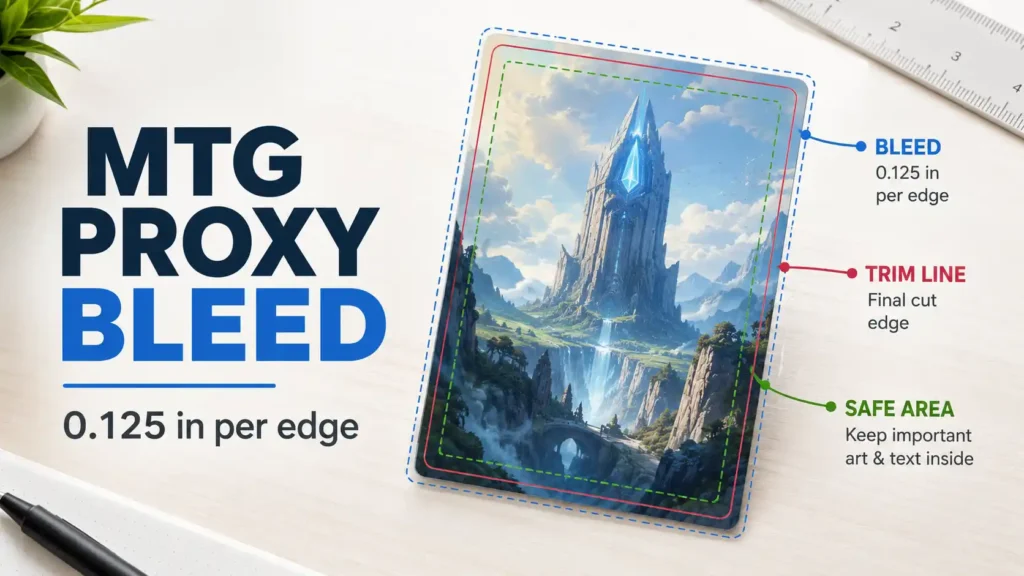
For example, a card built with 0.125 inch of bleed on every side would be 2.75 by 3.75 inches before trimming. At 300 PPI, that equals approximately 825 by 1,125 pixels. Printer templates can differ slightly, particularly when they use metric dimensions, so the printer’s supplied template should always override generic pixel recommendations.
MakePlayingCards lists a minimum resolution of 300 DPI for its 63 by 88 mm cards and requires approximately 1/8 inch of bleed and an additional safe margin. It also accepts several file formats, including JPG, PNG, TIFF, and PDF. late effective resolution with this formula:
Image width in pixels ÷ printed width in inches = effective PPI
A 900-pixel-wide card printed at 2.5 inches has an effective resolution of 360 PPI.
A 600-pixel-wide card printed at 2.5 inches has an effective resolution of 240 PPI, regardless of what the file’s DPI metadata claims.
Changing “72 DPI” to “600 DPI” without adding real image information is not enhancement. It is paperwork.
Bleed and Safe Areas Still Apply
The best file format for printing MTG proxy cards will not prevent white edges when the design stops at the trim line.
Background artwork and border colors should extend past the finished edge into the printer’s required bleed area. Rules text, mana costs, power and toughness values, and other important details should remain inside the safe area.
Also avoid adding digitally rounded corners unless the printer specifically requests them. Professionally manufactured cards are normally cut with rounded corners after printing. A card image that already contains transparent or white rounded corners can produce visible wedges when the physical cut shifts slightly.
Always download the printer’s template before preparing a large order. One printer may require 1/8 inch of bleed, while another may generate bleed automatically or expect different pixel dimensions.
Recommended Export Settings
For Individual PNG Cards
- Export at the printer’s required dimensions.
- Use at least 300 effective PPI.
- Include the correct bleed area.
- Keep important elements inside the safe zone.
- Export directly from the original card maker or design file.
- Use the color profile requested by the printer.
- Avoid transparent gaps around the outside of the card.
- Do not resize the file after exporting unless absolutely necessary.
For Print-Ready PDFs
- Set the document to the correct physical page size.
- Place cards at their exact finished dimensions.
- Include bleed when required.
- Do not downsample images below 300 PPI.
- Embed fonts or outline them when the printer requests it.
- Use high-quality or lossless compression.
- Confirm front and back pages are paired correctly.
- Add crop marks only when requested.
- Print a test page at 100 percent scale before submitting the file.
For JPG Cards
- Export at maximum or near-maximum quality.
- Export only once from the original file.
- Avoid repeated editing and resaving.
- Inspect small text and mana symbols at 100 percent zoom.
- Choose PNG instead when both formats are accepted.
Exporting From Popular MTG Card Makers
Card Conjurer
Card Conjurer provides an “Include Template Margins” option when downloading cards. Its FAQ specifically recommends enabling the template margins when preparing poker-size cards for MakePlayingCards because that workflow requires a bleed edge. full-resolution card with the appropriate margins. Do not use a screenshot of the editor preview.
MTGCardBuilder
MTGCardBuilder provides a separate printing tool that can arrange up to nine card images on Letter or A4 paper. The tool allows users to specify card size, bleed, spacing, PPI, and cutting aids, then download the completed sheet as either PNG or PDF. ting, choose PDF because it preserves the page layout. For uploading the individual cards to another service, use the original full-resolution card images instead of extracting them from the sheet.
Photoshop, Affinity Photo, and Similar Editors
Keep the layered source file as your master. Export a flattened PNG for individual cards or place the finished cards into a properly sized document and export a print-ready PDF.
Do not send a printer the only copy of your layered master file. Keep it available in case text, bleed, color, or positioning needs to be corrected.
Common File-Preparation Mistakes
Avoid these errors before placing an order:
- Taking a screenshot instead of downloading the full-resolution card
- Converting a clean PNG to JPG without a reason
- Assuming the DPI label matters more than pixel dimensions
- Adding pixels through basic upscaling and expecting new detail
- Forgetting bleed
- Placing important text too close to the edge
- Baking rounded corners into the artwork
- Using a PDF that contains low-resolution source images
- Exporting a PDF with aggressive downsampling
- Allowing transparent pixels around the outside edge
- Sending editable files without fonts or linked artwork
- Failing to check double-sided card pairing
- Trusting the preview without inspecting the downloaded file
Final Recommendation
For most players, the best file format for printing MTG proxy cards is PNG when submitting individual cards. It is reliable, lossless, widely supported, and well suited to the mixture of artwork and small graphic details found on an MTG card.
Use PDF when you are submitting a finished page layout, preparing files for home printing, pairing card fronts and backs, or working with a commercial printer that requests press-ready documents.
Use JPG only as a compatibility fallback. It can produce acceptable results, but it offers fewer advantages and more opportunities for accidental quality loss.
And remember that the extension is only one part of the file. A properly sized, sharp, bleed-ready PNG will beat a poorly exported PDF every time.
FAQs
Is PNG or PDF Better for Printing MTG Proxies?
PNG is better for individual cards, while PDF is better for complete sheets and fixed page layouts. Choose the format that matches the printer’s ordering workflow.
Can I Print MTG Proxy Cards From JPG Files?
Yes. A maximum-quality JPG exported from the original design can print well, but PNG is safer for preserving small text, symbols, and hard edges.
Is 600 DPI Better Than 300 DPI for MTG Proxy Cards?
Sometimes, but only when the original design contains enough detail and the printer’s workflow can reproduce it. A true 600 PPI export may improve tiny text or line elements, but upscaling a weak 300 PPI image does not create additional real detail.
Should MTG Proxy Files Be RGB or CMYK?
Use the color space requested by the printer. Many browser-based card uploaders are designed around RGB images, while some commercial print workflows request CMYK PDFs. Do not perform a blind CMYK conversion without knowing the printer’s profile and requirements.
Can I Send a Photoshop File to a Proxy Printer?
Only when the printer explicitly accepts native files. A flattened PNG or print-ready PDF is less likely to encounter missing fonts, linked images, or incompatible effects.
Does Converting a PNG to PDF Improve Its Quality?
No. Converting a PNG to PDF may preserve its placement and physical size, but it cannot add image detail that was not present in the original PNG.
References
JPEG vs. PNG: Which One Should You Use?
Adobe
https://www.adobe.com/creativecloud/file-types/image/comparison/jpeg-vs-png.html
Accessed July 15, 2026. Used for lossless and lossy compression characteristics. xport Options in InDesign**
Adobe
https://helpx.adobe.com/indesign/desktop/save-export-and-publish/save-and-export/adobe-pdf-export-options.html
Accessed July 15, 2026. Used for PDF compression, downsampling, bleed, and color-output controls. Requirements**
PrintMTG
https://printmtg.com/print-file-requirements/
Accessed July 15, 2026. Used for current PDF, PNG, TIFF, resolution, bleed, and native-file guidance. Cards, 63 by 88 mm**
MakePlayingCards
https://www.makeplayingcards.com/design/custom-blank-card.html
Accessed July 15, 2026. Used for accepted formats, minimum resolution, bleed, and safe-area requirements. er FAQ**
Card Conjurer
https://cardconjurer.com/info
Accessed July 15, 2026. Used for template-margin and MakePlayingCards export guidance. ool PDF Generator**
MTGCardBuilder
https://mtgcardbuilder.com/cardprinttoolpdf/
Accessed July 15, 2026. Used for current sheet-layout, PPI, bleed, PNG, and PDF export features. GProxy.com’s Ordering System**
MTGProxy
https://www.mtgproxy.com/guide-mtgproxy-coms-ordering-system/
Accessed July 15, 2026. Used for current custom-upload format and resolution requirements. 800-word edit or a matching PNG versus JPG versus PDF comparison chart can be produced from this draft.